
Help Guide
Bringing your vision to life.
This Help Guide includes all the information you need to ensure you receive the best result for your project in the shortest time possible. Please take a few minutes to read it through so you have all the tips on how to get your project underway as smoothly as possible.
Table of Contents
Click on the title of the sub section you need to be taken directly to that section of the Help Guide.
a. What information do I need?
b. What are the minimum requirements?
c. Taking site photos
a. The Project Submission Form
b. Naming your files
c. Minimum requirements for file sizes
d. Accepted file types
a. Primary Product vs Add-on
b. What does ‘Draft’ mean?
c. What’s included in the ‘First Draft’?
d. How long will my project take?
e. What if I need to provide more information after my initial submission?
f. Requests for clarification or more information
g. How will my project be delivered?
h. What is your refund policy?
i. How long do you retain and store my project files for?
a. What is a revision?
b. Revisions are anchored to your Primary Product
c. How do I submit my revisions?
d. How long will they take?
e. What if my revisions involve significant re-modelling of the design?
Section 1 - Preparing your information
To answer this question, it might be easiest to start with the two (2) questions we ask at the start of every job:
- What is existing and being retained?
- What is new and being proposed?
If you can think about these two questions when you are putting together your design files it will go a long way to helping us to do a great job for you in the least amount of time.
Below are our recommendations for different types of information for you to consider.
Existing features being retained
Site plan – Please provide a copy of the site plan as it was before you added your design. This will help us immediately see what is happening on site and distinguish what is already there from what is being proposed.
Feature Survey – If you have a feature survey with contours and spot levels, please send it through, especially if levels, retaining walls and re-grading is important to your design. Like the site plan, this will help us understand what is/was happening on site before your design was introduced.
House Plans– We need information about your clients house, especially if we are going to model their home in 3D.
– For 2D CAD plans, just the outer footprint of the house is acceptable as a bare minimum. If you provide floor plans showing the position of ground floor doors and windows, we will definitely add those in for you.
– For 3D Modeling, we need to see the house in elevation. Ideally you will have a full set of architectural house plans complete with elevation drawings. If your clients cannot provide those, we accept site photos as long as they are taken in accordance with our simple guide to taking site photos (see below).
Site Photos – Definitely the quickest way to give us an idea of what the site looks like and help us to make sense what’s shown on the plans. Wherever possible, please take site photos looking square on at the subject (see our simple guide to taking site photos).
New features being proposed
Landscape Concept – Please provide a copy of your landscape concept, drawn to scale and in accordance with our Minimum Requirements outlined in the next section. Easily the biggest trap you can fall into is to RUSH your drawing. Please take just a few extra minutes each time you prepare your design for us, just to make sure your drawings are legible and describe your design clearly and accurately. The section below about our Minimum Requirements will definitely help!
Supporting images – We LOVE getting images of any products, materials, furniture, firepits, pots, barbecues, surfaces, finishes, feature trees or shrubs in your design that will help us to immediately get a picture of what is shown on the drawings.
VIDEO (7mins) Guides you through the various types of information we need with examples.
VIDEO (20mins) Guides you through several real customer projects. You will see what they sent us and what we sent them.
We’re a pretty accommodating bunch here at Pitch Box and the last thing we want you to feel is that putting together the information we need is a drag.
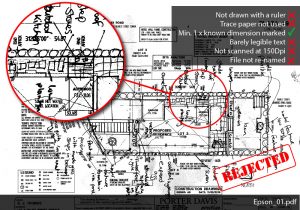
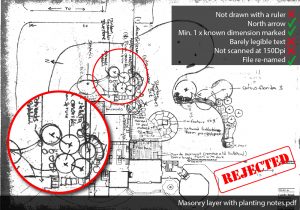
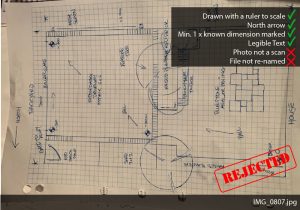
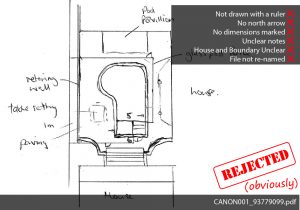
That said, there are a few “non-negotiables” we need you to abide by, some Golden Rules, if you will.
5 Golden Rules
- Show a NORTH ARROW
- Mark ONE known dimension on the plan
- Have LEGIBLE text
- Use a RULER for straight lines
- SCAN all plans at a minimum 150dpi (preferably 300dpi)
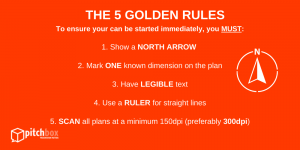
These aren’t complicated. If anything, they’re just common courtesy for communicating ideas, designer-to-designer.
If you break the Golden Rules, you’re going to get a little reminder from us, asking you to provide the required information. Otherwise it could delay your presentation and cause a few heads to shake (and no one wants that!).
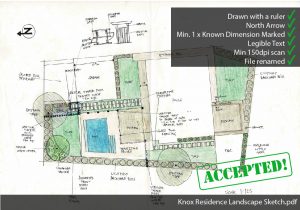
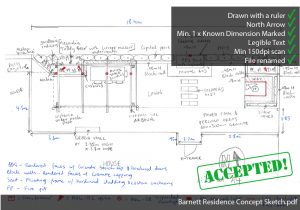
Please take a moment to familiarise yourself with the rules and some examples of projects we’ve accepted and rejected below.
Site photos are helpful for all 2D orders and compulsory for all 3D presentations, regardless of whether the site has existing buildings or if it’s still a vacant block.
Please consider the team at Pitch Box when taking site photos. The photos you’re taking for your own reference might not necessarily be useful to us.
We use site photos as a reference for:
- Existing landscape features being retained
- Elevations of the house including doors, windows,
- Elevations of the house including balconies and rooflines.
- Materials, colours and finishes.
- Boundary walls and/or fences.
- Level changes and topography.
- Context (ie what’s around this site?)
What we need
A set of site photos that “document” the site clearly with files re-named to make it clear what we are looking at in each folder. Each photo should be:
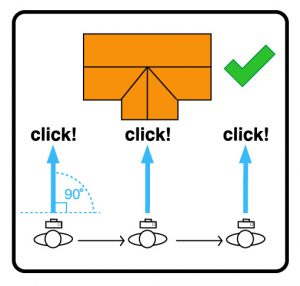
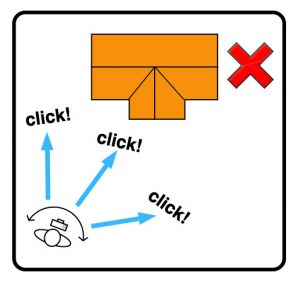
- Taken at 90 degrees to the subject wherever possible.
- Inclusive of the full elevation of the subject, wherever possible.
- Overlapping other photos for objects that won’t fit in one frame.
- Re-named to reference the site or feature.
- Maximum file size 3Mb. Read more about file sizes and how to resize easily.
Section 2 - Onboarding your project
The Project Submission Form (PSF) is a simple yet essential part of the on-boarding process. The form serves three purposes:
- It’s a checklist to ensure you remember to send everything we need.
- It’s a reference to bring our team up to speed with the scope of your design.
- It’s a portal for you to send your design files to us.
The PSF is read carefully by every person involved in your project including both Managers and Creators.
Without it, we will not start work on your presentation. If it is incomplete or contains false answers it will be rejected, delaying the launch and subsequently the delivery of your presentation until resolved.
It is a critical part of the Pitch Box process to help reduce questions and avoid delays . Once you’ve done a couple of projects, completing the form should not take more than 5-10 minutes.
Where to find your PSF
You can access the form in one of two places:
- Via your Customer Dashboard – there’s a button within the Project listing.
- Via the link in your Order Confirmation Email that you receive after making payment.
Once we’ve completed the first draft, we’ll assess and review everything ourselves first, in-house. Then you’ll receive an email notification telling you that your presentation is ready to review. You’ll click the link to access all the files. If you’re happy with everything, great! Download and go present to your clients. Or if you require some changes, you can request revisions through the link we send you.
For every new project submission we might receive a dozen or more files containing an array of different information. Sometimes its not obvious from looking at a file, what exactly you are communicating to us by sending it. This is especially true for any plan drawings and inspiration images.
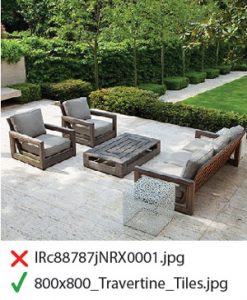
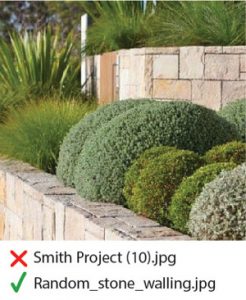
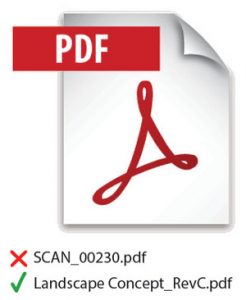
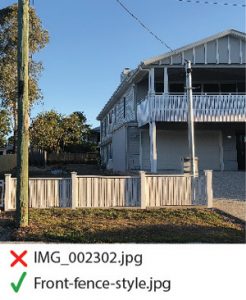
For this reason we have made it a requirement that all the files you submit have file names that are relevant to the subject of the file. For example, site photos are named 'Sitephoto_01.jpg', an inspiration image of an outdoor shower is named 'Outdoor_shower.jpg' and the Concept Plan is named 'Concept_plan.pdf' and so on.
This is a small step that goes a long way to improve the speed and accuracy at our end. We know exactly what we are looking for and why you are supplying us with that file, taking all the guesswork out of it.
Examples of Re-named Files
Notice how changing the file name makes it immediately clear what we are looking for (even before opening the file).
The Project Submission Form (PSF) accepts the following file types: PDF, JPG, GIF, DWG, DXF, SKP, AI, PSD.
You can upload individual files up to 20Mb in size. If you try to upload a file larger than 20Mb it will be rejected.
To send files larger files please use a third party file transfer site such as Dropbox, WeTransfer or Google Drive
Scanned Plans: Min 150Dpi although ideally 300Dpi so we can zoom in. Note: Photos of plans will be rejected, they must be scanned.
Site Photos: Max 3Mb in size.
Inspiration Images: Max 3Mb in size.
Need help resizing?
There are many free websites that allow you to quickly resize images. Our favourite is Bulk Resize Photos where you can simply drag and drop all your images at once, set the desired maximum file size (3Mb) and it will resize your images in seconds, ready to download.
Section 3 - The Pitch Box Machine
These two components of every presentation are produced and delivered separately.
Please take a moment to understand the difference as this affects how your presentation is produced and delivered. This also affects the revisions included with your order.
2D Primary Products
- Client Presentation - Concept Plan
- Development Approval Drawings - Location & site plans
Sketch Up Primary Products
- House & existing buildings only
3D Primary Products
- Landscape - 3D renders (daytime images)
- House - 3D Basic or Premium Packs
- Pool - 3D Starter or Pro Pack
For 3D Modelling
For all 3D projects, the primary product is modelling the design and producing a set of 3D renders (still images in JPG format).
This forms the basis of any 3D presentation. On top of this a number of ‘Add-ons’ are available including a fly-through video, lighting effects and a branded web page.
For 2D Drafting
For all 2D presentations, the primary product is either going to be the Concept Plan (in the case of Drawings for Clients) or the Location & Site Plan (in the case of Drawings for DA Approval).
This forms the basis of any 2D presentation. On top of this a number of ‘add-ons’ are available including Planting Plans, Quantities Plans, Layout & Dimensions Plans and Schematic Lighting Plans. For DA Approval Drawings you can also choose to include Section/Elevation Drawings.
Why is this relevant?
This is relevant because our delivery policy is anchored to the Primary Product only. That is, if we promise 5 days to deliver the first draft, and you have ordered a 3D presentation that includes a fly-through video, you will NOT receive the fly-through video on the 5th day. You will receive the 3D renders (Primary Product). Once you have approved those renders, we will then proceed with preparing your fly-through.
For 2D presentations, we will always endeavour to deliver the full set of drawings you ordered at the same time, however in terms of our actual delivery policies, we are only required to deliver the Primary Product with the first draft, followed by the Add-ons as soon as possible following that.
A 'Draft' is our translation of the design information you’ve provided into the deliverable formats you have ordered, such as a Concept Plan or 3D Renders.
Each time you supply design information, whether at the outset of a new job or as part of a request for changes, we will supply a draft to seek your confirmation that we have correctly interpreted your design information and give you the opportunity to highlight anything that we may have missed.
The first draft is basically our first “pass” of your design and your first opportunity to see how your design has been translated.
While the first draft may well be perfect, it’s more likely that you will want to adjust your design in preparation for showing your clients.
The first draft will always include the Primary Product you ordered but not always the Add-ons you’ve ordered. Please read on to understand how this works.
For 3D Modeling
IMPORTANT: For 3D presentations, the first draft excludes Add-Ons.
This is because 3D fly-throughs and Lighting Effects take several hours for our machines to render so we always ensure you’re happy with the draft first, before setting those in motion. Until we get your approval, we will move onto another project. Once you give your approval we will prioritise your project again. Make sense?
When you receive the first draft of your 3D renders, please allow yourself the time to check the images thoroughly. If you’re happy with everything “as is” you can respond with your approval to proceed with the Add-ons.
If you need changes, we will address those first, issue a second draft and again seek your approval before proceeding with any Add-ons.
For 2D Drafting
You’ll receive a draft of all the plans you’ve ordered in the first draft.
The drawings will include all the information you’ve provided on your initial concept sketches. If there is anything we overlooked/missed/omitted, despite clear instructions on your concept sketches we will have those amended for you as soon as possible.
If there is any information that you didn’t provide on your initial sketches, such as specific planting details, levels or even elements of your design, you can have those added simply by markup up your plans and submitting a Revision Form.
Knowing how this process works, many of our customers use the first draft to get their initial ideas down on paper (to scale and printable) and make use of their complimentary revisions to add the details later.
You can learn more about that in Section 4 – Revisions.
Our promise to every customer is to deliver the first draft of any project within 10 business days. For members, we guarantee delivery within 5 business days.
The clock starts ticking when:
- We have received your order, paid in full
- We have received your completed Project Submission Form
- We confirm your design information meets our Minimum Requirements and we have all the necessary information to commence work.
- This happens before 12 midday, otherwise the clock starts the next day.
If anything is missing from your PSF or design information, you will be the first to know. We’ll contact you immediately via email or phone to clarify any omissions or discrepancies.
While the first draft may well be perfect, it’s more likely that you will want to adjust your design in preparation for showing your clients.
What about changes?
If there are any changes required that are due to omission by us, despite clear instructions provided by you, we will have those resolved on the same day whenever possible.
For all other changes, including revision requests please allow 48 hours to see those changes delivered.
What about Add-Ons?
Once you’ve reviewed a draft and have provided approval to proceed with the Add-ons, please allow up to 3 business days for those to be delivered.
Sometimes you'll find instances of needing to provide more information after your initial submission. For example, you might accidentally leave an element out of your uploaded sketch.
If this is the case, the first thing you need to do is contact us as soon as possible to let us know. Depending on which stage of the process your project has reached, it may be a simple matter of throwing the additional information into the mix without affecting anything.
On the other hand, while we should be able to accommodate the change, it could mean a delay in delivery. Its best that you get in touch and ask straight away.
If we require clarification of your design intention, conflicting information or other discrepancies, our Customer Support Manager will be in touch via email seeking clarification as soon as possible.
Similarly, if we require more information, such as photos, plans or precedent images, our Customer Support Manager will be in touch immediately to let you know.
We will indicate within the email whether the information we’re seeking is causing your project to be put on hold, which could affect the delivery time, or if work is able to continue.
Either way, when you receive a Request for Clarification or Request for Information, please make time to attend to our request, particularly if your project is time sensitive.
Whenever we have files to share with you, we’ll notify you by email.
The email will contain two important links:
- The link to download your files.
- The link to access the Revision Request Form.
The download link is provided via Dropbox. When you click the link in the email, you’ll be taken to the Dropbox website where you can view and download the files.
If you’re reviewing a video, it’s best to download it to your computer first rather than stream it from the Dropbox website. This will ensure you’re seeing it at the correct resolution.
Pitch Box stores your project files for a maximum of 3 years. However, we highly recommend that you download and save your files to your own computer storage system for safe keeping.
Our refund policy forms part of our Terms & Conditions. Your access to and use of our services is conditioned on acceptance of these terms.
If you decide not to proceed with an order after you have paid for it, and we have not commenced work on your order, you can request a refund. This request must be made within 90 days of the date that you submitted your order. Your refund will be less the Stripe fees incurred and a 2% admin fee. You will not be entitled to a refund if we have already delivered the product or service. If you are dissatisfied with the result, you may be entitled to a revision of the work delivered. Any requests for refunds of orders that have not been delivered and are more than 90 days after submitting the order will not be granted.
We retain and store project files for a maximum period of five (5) years from the date of project completion. After this time, all associated files may be permanently deleted from our system without further notice.
To prevent loss of important documents, we strongly recommend that you download and securely store your project files in your own storage system as soon as they are provided. We do not accept liability for any files that are lost, deleted, or otherwise unavailable after the five-year retention period.
Section 4 - Revisions
Making changes to your design is all part of the process of producing something great.
Which is why we give you a complimentary round of changes with each order that you place with us.
But there are a few rules around how this works to make sure it’s a fair deal for everyone.
Rectifications (WE missed something)
Any changes that need to be made due to our own omission, error or oversight despite clear instructions, notes, images or linework in the information you provided will be rectified at our cost, no questions asked.
If it was there, clear as day and we messed up, we’ll sort it.
Revisions (YOU missed something)
All other changes are considered to be revisions.
These could be due to your own omission, changing your mind, client feedback, lack of clarity, discrepancies, conflicting information, assumed knowledge or requiring telepathy can be resolved as part of the revisions included with your order.
If it wasn’t there, clear as day, it’s a revision.
When we refer to revisions, we’re talking about a “round of changes”, ie a single list of all the things you want to have adjusted in your design, that our guys can attend to in one sitting.
The list can be one change or 30. You can refer to the changes as “changes”, “revisions”, “amendments”, “adjustments” or “tweaks” – it’s all the same to us.
The main point to understand is that we attend to all the changes that are on the list in one sitting. When you submit your revisions, everything you need changed had better be on that list. If you miss anything (no matter how small) and you want it changed, the “official” rule is that it will need to form part of a subsequent revision request.
You get one round of changes included with every order, which can be redeemed anytime up to 6 months from when you first made the purchase. If you require changes later than 6 months from the date of purchase, they’re available for a low fixed price via your dashboard. If become a member you will receive two (2) complimentary revisions.
When you order a presentation at Pitch Box, there are two parts to your order. Please refer to the Primary Product vs Add-ons and What’s included in the First Draft? sections of the Help Guide.
Understanding the difference is important because the revisions (rounds of changes) included with your purchase are anchored to the main component of the order, the Primary Product and not the individual Add-ons.
This is because, any and all changes to a presentation must be made to the primary product first, before they can also be reflected in the Add-ons.
Let’s say you ordered a 3D presentation with a fly-through
To begin, you will see there is 1 revision remaining in your dashboard.
If, after receiving the first draft, you are happy with the 3D renders and give your approval to proceed with the fly-through, then you will still have that revision remaining for that project.
But.. let’s say you weren’t happy with the renders and you request revisions to your design.
Then let’s say those revisions come back but you’re still not happy with your design! You’ll need to purchase an Extra Revision and submit another request. We still aren’t able to proceed with the fly-through since you haven’t approved the renders.
Finally, with this next draft you’re happy with the second round of revisions and give your approval to proceed with the fly-through.
At this point, you now have no revisions remaining even though you’ve only received one version of the fly-through. As stated above, this is because revisions are anchored to the Primary Product (in this case, 3D renders) and not Add-ons (in this case the fly-through).
If you want to update something you see in the fly-through, you will need to purchase an Extra Revision so we can first make changes to the 3D model and issue renders for your approval.
Via a simple online form, called a ‘Revision Request Form’. We do not accept revision requests via email, only via the form. Please do not email our Customer Support Manager with the changes you’d like, please use the form.
Much like the Project Submission Form, the Revision Request Form is a simple yet essential reference document that will be read by everyone involved in your project.
The form serves three purposes:
- It’s a record of your request to use one of the revisions included with your order.
- It’s a reference and checklist for our team to ensure we’ve covered everything.
- It’s a portal for you to send your design markups to us.
Without the form, we will not make any revisions to your presentation. Like the Project Submission Form, if the Revision Request Form is incomplete or contains false information it will be rejected, potentially delaying delivery.
Use the form together with the steps outlined below.
Best Practice for Sending Revisions
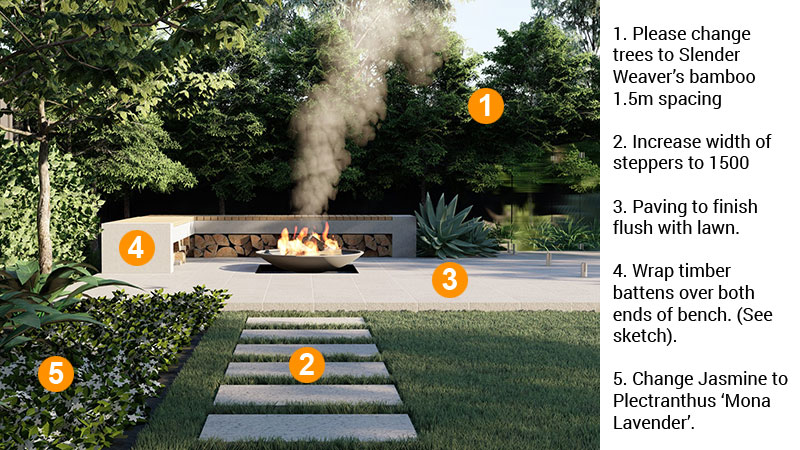
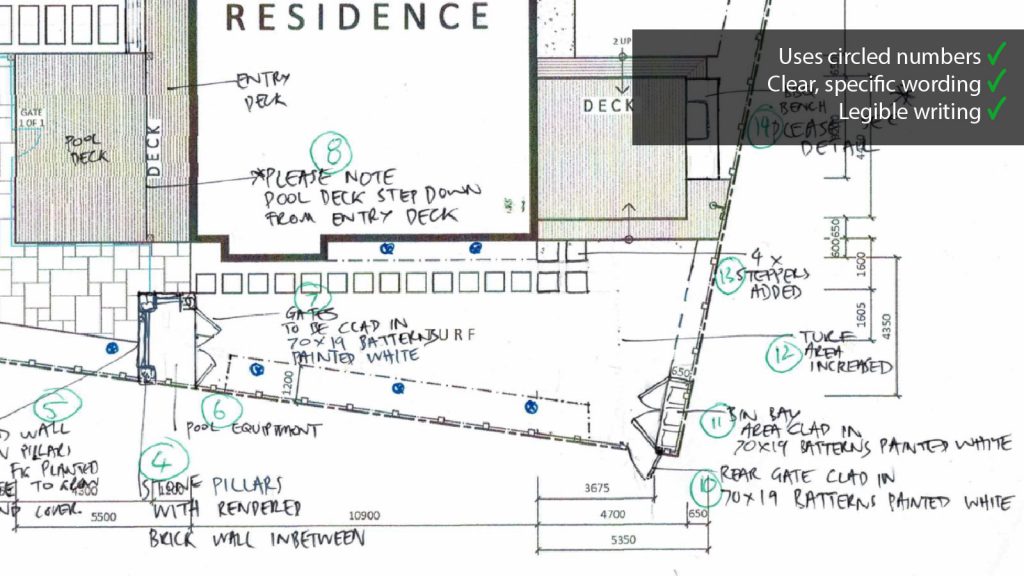
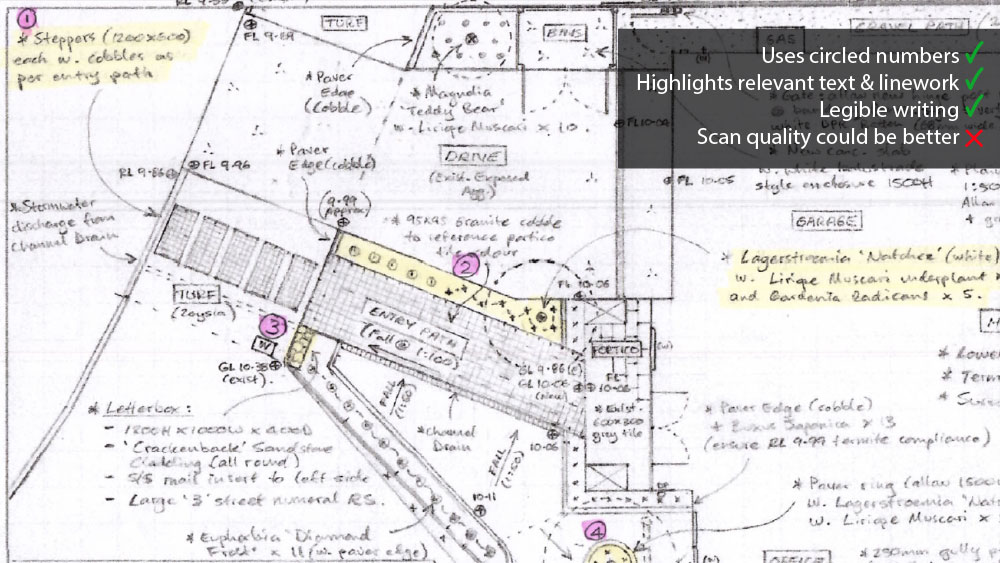
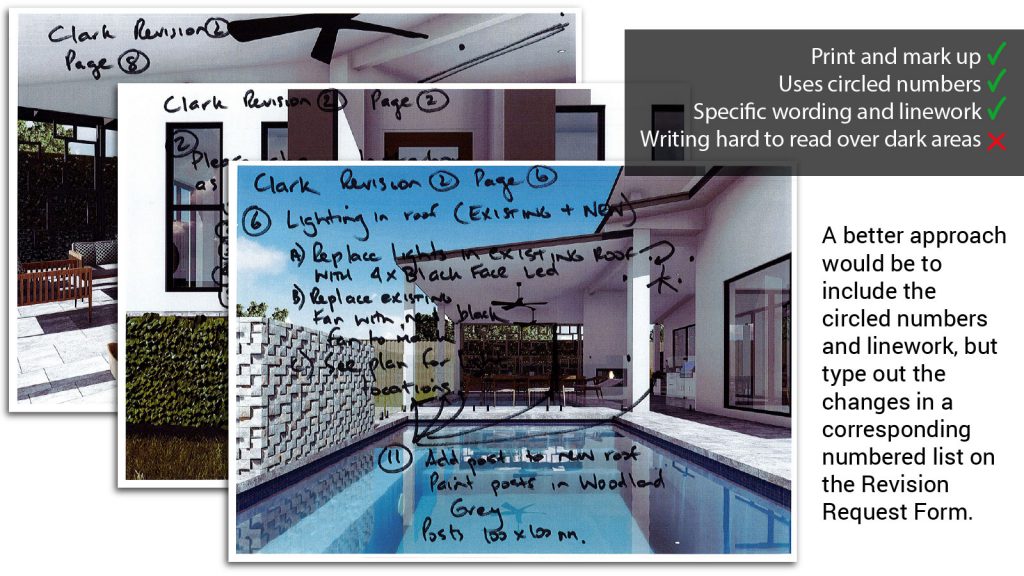
- Sequentially number (1,2,3,4..) all the items that need changing directly on the plan or 3D renders in the location of each required change.
- Prepare a numbered list of written changes that correspond to each number on the drawings. You can copy and paste this list into the Revision Request Form.
- Gather supporting information including your marked up plans, hand sketches, precedent or inspiration images, photos of plants, materials and furniture.
- Prepare the files by re-naming them before using the form to upload them.
- Be specific!
- Before you submit the Revision Request Form, have a read through your own written instructions. Are they clear? Are they specific? Do they leave any room for questioning?
Consider the difference between vague and specific instructions such as:
'Wall is too low' - vs - 'Increase wall height to 150mm'
'Make darker' - vs - 'Change colour to Dulux Monument or similar charcoal colour'
'Change hedge' - vs - 'Change grasses to clipped hedge, murraya or similar'
'Fence to be wood' - vs - 'Replace with treated pine lap'n'cap fencing'
'Add potted plant' - vs - 'Add 600mm white pot with mixed succulents. See uploaded image.'
Examples of Revision Markups
We aim to deliver all revisions within 48 hours of receipt of your Revision request Form. If you follow Best Practice for Sending Revisions, this shouldn’t be a problem.
If you feel that the extent of changes constitutes a re-design rather than a round of revisions, get in touch with us. We will assess the changes and let you know if it means significant re-modelling. In the unlikely case this happens, we may need to reasonably request additional fees. We can cross that bridge if we get to it.